Portrait photographer
A small blemish or temporary mark distracts from an otherwise finished portrait.
The selected area is softened while the surrounding face remains recognizable and textured.
magic eraser for faceCan you use a magic eraser on skin? In a photo, yes—but think of it as removing or softening visible details in an image, not treating real skin. This guide explains the safe digital use case and the limits that keep edits natural.

A magic eraser for skin is a digital photo-editing tool that removes selected marks, spots, or distractions from a portrait. It does not touch your body, apply a product, or replace medical or cosmetic care.
A small blemish or temporary mark distracts from an otherwise finished portrait.
The selected area is softened while the surrounding face remains recognizable and textured.
magic eraser for faceA campaign image needs a quick cleanup before publication, but the subject should still look like themselves.
Minor distractions can be removed without rebuilding the entire composition.
magic eraser photoA product or profile photo includes a stray reflection, spot, or background detail near a person.
The distracting detail can be cleared so attention returns to the subject and the image purpose.
magic eraser onlineA favorite snapshot has one small mark that becomes noticeable when the image is enlarged.
A restrained edit can make the photo feel cleaner without changing its story.
magic eraser photoThe process is visual and selective: identify the unwanted detail, let the editor rebuild that area, then inspect the result at full size before keeping it.
Mark the blemish, spot, stray object, or other small area you want to remove. Keep the selection tight so nearby eyes, hair, texture, and edges are preserved.
The editor uses surrounding visual information to create a replacement that fits the local color, lighting, and texture. Results depend on the image and the size of the selected area.
Review the edited photo at its normal viewing size and zoom in for artifacts. Undo or refine the selection if the skin looks repeated, blurred, or unnaturally smooth.
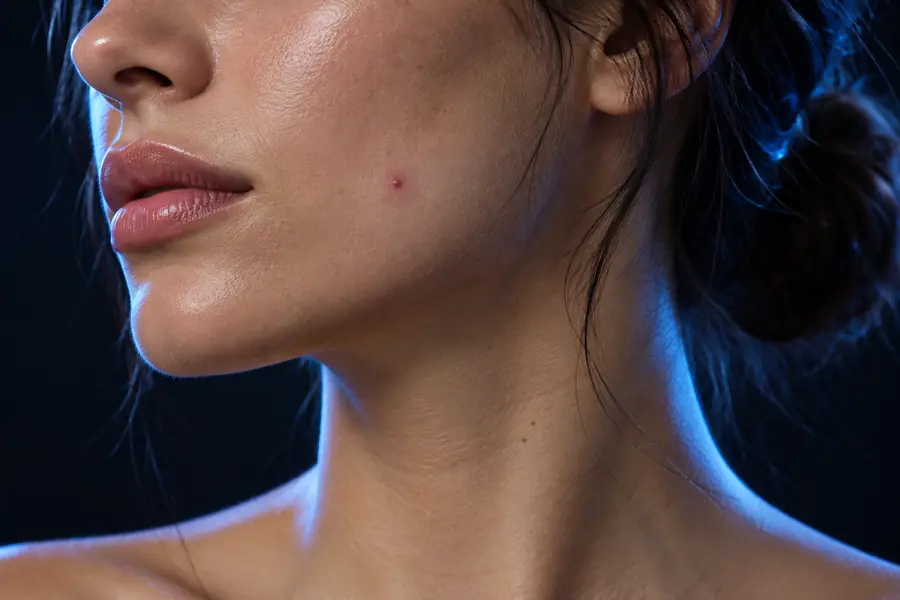 Before
 After
After
A magic eraser is useful for controlled image cleanup, but it is not a skin-care tool and it cannot guarantee a perfect reconstruction in every portrait.
The digital tool changes pixels in a photo only. It does not remove dirt, disinfect skin, treat acne, or improve a physical surface.
Workaround
Use appropriate skin-care or professional advice for real skin concerns; use the editor only on the image.
Large selections, complicated hair, fingers, jewelry, patterned clothing, and strong shadows can leave visible artifacts or invented texture.
Workaround
Use smaller selections, review at close range, and make several restrained edits instead of one broad removal.
A polished portrait does not tell you whether a mark is harmless, temporary, or medically important.
Workaround
Do not edit a photo as a substitute for observing a changing mark or seeking qualified medical guidance.
Over-editing can make skin look waxy, repetitive, blurred, or unlike the person in the original photo.
Workaround
Keep texture, pores, lines, and expression where they are not part of the requested cleanup.
The best choice depends on whether the goal is a subtle portrait correction or a broader image cleanup. These two approaches should not be confused.
Where it works
Digital magic eraser
Inside a photo or image file
Physical cleaning sponge
On selected household surfaces
What it changes
Digital magic eraser
Pixels, marks, and visual distractions
Physical cleaning sponge
Surface residue through physical abrasion
Effect on skin
Digital magic eraser
Changes how skin appears in an image
Physical cleaning sponge
Not intended for use on human skin
Typical user
Digital magic eraser
Photographers, creators, sellers, and editors
Physical cleaning sponge
People cleaning durable household materials
Main risk
Digital magic eraser
Artifacts, blur, or an unrealistic portrait
Physical cleaning sponge
Irritation, abrasion, or surface damage if misused
Best practice
Digital magic eraser
Make a small edit and inspect the result
Physical cleaning sponge
Follow the product label and test a hidden area
Use Magic Eraser for the image in front of you: remove a small distraction, compare the result with the original, and keep the person recognizable. For real skin, choose real skin-care guidance instead of a household cleaning product.
Edit your photoYou can use a digital magic eraser to edit how skin appears in a photograph. You should not use a household Magic Eraser sponge on real skin, because it is an abrasive cleaning product and can cause irritation or damage.
For a photo, a restrained edit is generally the safer interpretation of the tool. Remove only the detail you intend to change, inspect the result closely, and avoid making the person look artificially smooth or unrecognizable.
No. An image editor changes pixels and cannot treat acne, diagnose a condition, disinfect skin, or heal a mark. For a real skin concern, use suitable care or ask a qualified medical professional.
A physical cleaning sponge can be abrasive and may cause redness, irritation, scratches, or discomfort. Do not use it on your face or body; rinse the area and seek medical advice if irritation is severe or persistent.
Use a small selection, preserve surrounding texture, and compare the edited image with the original. If the result looks waxy, repeated, blurred, or changes the person’s identity, undo the edit and try a smaller area.