Photo editor
A passerby draws attention away from the subject of a travel photograph.
Select the passerby and inspect the filled area for repeated textures or distorted edges. Results depend on the background behind the person.
magic eraser photoPlain-English guide
What is a magic eraser? In photos, it means a tool that removes a selected distraction and fills the space using nearby image detail. In household cleaning, it usually means an abrasive melamine-foam sponge. The two share a name, not a method.

A photo magic eraser removes marked content from an image; a cleaning magic eraser rubs marks from a physical surface. Knowing which one someone means makes the advice useful.
A passerby draws attention away from the subject of a travel photograph.
Select the passerby and inspect the filled area for repeated textures or distorted edges. Results depend on the background behind the person.
magic eraser photoA removed object seems to leave new scenery behind it.
Understand that the editing tool estimates missing pixels rather than revealing an untouched scene that was hidden in the original file.
How does a magic eraser really work?A small distraction sits close to a face in a photograph.
Work cautiously around facial features, where an inaccurate fill is especially noticeable.
magic eraser for faceA scuff appears on a painted wall.
Check the finish before trying a damp melamine sponge; abrasion can remove paint or alter its sheen along with the mark.
how to use magic eraser on wallsIn a photo editor, removal is an image-reconstruction task. A physical cleaning sponge works by abrasion instead.
The editor identifies the person, object, text or blemish to remove. A careful selection includes the unwanted detail without needlessly covering important edges.
The software uses surrounding visual information to create a plausible replacement. It cannot recover the exact pixels that an object concealed when the picture was taken.
Zoom in on boundaries, shadows and repeating patterns. If the replacement looks wrong, a smaller selection or a different edit may help.
The name appears in several products and comparisons. These pages separate specific tools from the general idea.
A photo magic eraser is suited to removing visible distractions, but the filled area is an estimate. The cleaning version has different limits because it acts on the surface itself.
If a large object blocks a building, no photo-editing magic eraser can retrieve the building's exact appearance from that image alone.
Workaround
Use another photograph as a reference when accuracy matters, or treat the filled area as an illustrative edit.
Hair, reflections, shadows and patterned backgrounds can make a removal conspicuous even when the main object disappears.
Workaround
Inspect the result at full size and refine the edit in smaller areas.
A plausible-looking edited photograph is not evidence that the altered scene existed as shown.
Workaround
Keep the original and disclose meaningful edits when the image is used as a record.
Melamine foam can dull glossy coatings, abrade paint or leave visible changes on delicate surfaces.
Workaround
Follow the surface maker's guidance and test an inconspicuous spot first.
 With distraction
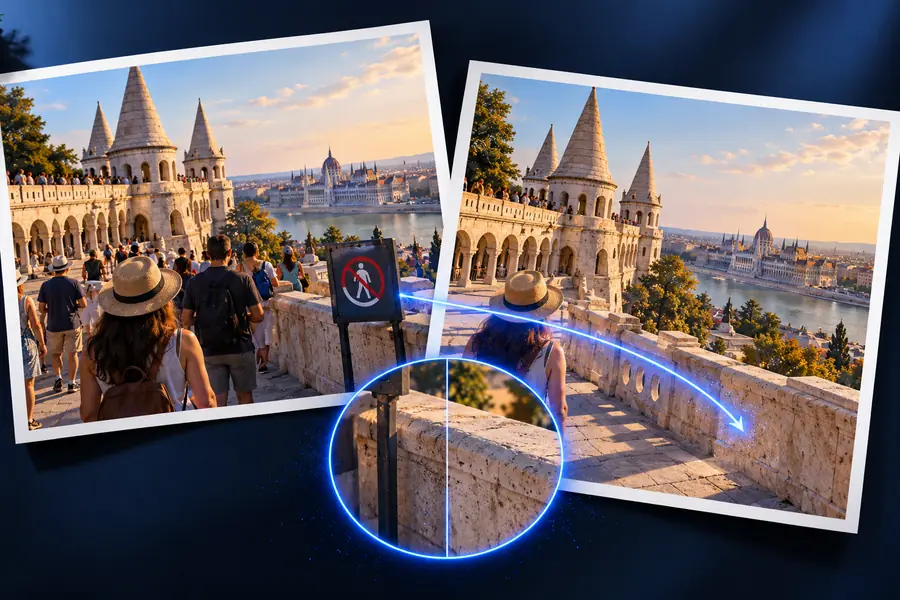 Without distraction
Photographers and designers use the photo-editing meaning when a distraction weakens an image. Home cleaners use the sponge meaning when dealing with a mark on a suitable surface. If you are working on a picture, Magic Eraser can point you toward photo tools; check the destination's available features before relying on a particular editing method.
Explore photo toolsThe phrase has two common meanings: a photo-editing tool for removing selected image content, and a melamine-foam sponge for cleaning physical surfaces. The first reconstructs pixels; the second removes marks through gentle abrasion. The right definition depends on whether you are editing a picture or cleaning an object.
It is a type of removal tool that replaces a selected area with an estimated continuation of the surrounding image. It can make a small distraction less noticeable, but it does not uncover the exact scene that was hidden behind an object.
No. A photo tool changes a digital image, while a melamine sponge physically rubs against a surface. Advice about image selections does not apply to paint or countertops, and cleaning guidance does not explain how image reconstruction works.
For photo editing, it is a poor choice when an edit must preserve documentary accuracy or recreate a large hidden area exactly. For cleaning, avoid using a melamine sponge on a delicate finish without checking the manufacturer's guidance and testing a discreet spot.